Set your sales tax rate
The rate the register and storefront charge on goods, and the state you collect in.
2 min read · in your admin: /admin/sales-tax
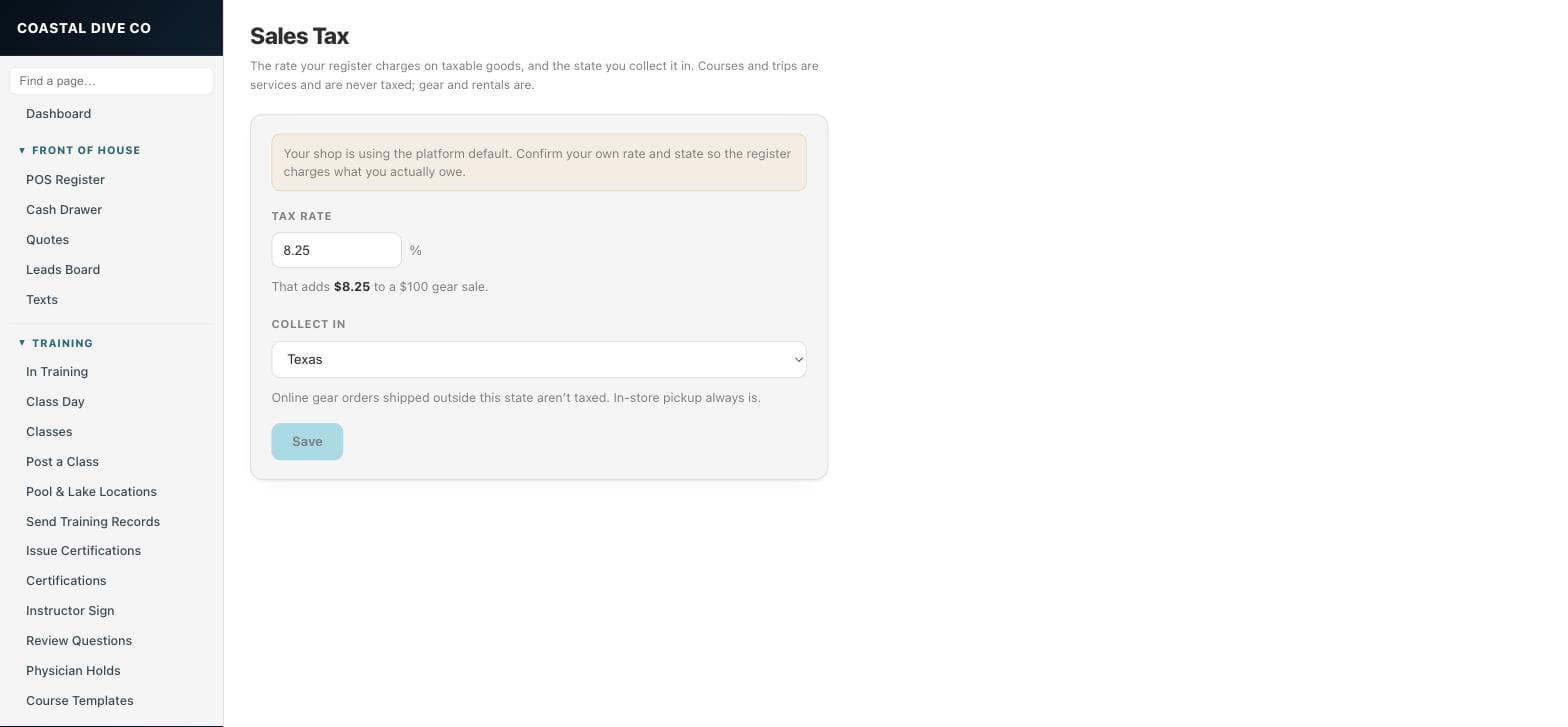
Sales Tax sets the rate your register charges on taxable goods and the state you collect it in. Courses and trips are services and are never taxed; gear and rentals are. The register, the server-side check behind it, and the gear storefront all read this one setting. It is an admin-only page.
Confirm your rate
- Open Settings → Sales Tax.
- If you see “Your shop is using the platform default”, your rate has never been confirmed. Do this before your first in-person sale.
- Enter Tax rate as a percent, up to three decimals (8.25, not 0.0825). The line underneath shows what it adds to a $100 gear sale.
- Choose Collect in from the state list.
- Press Save. Saved ✓ confirms it, and the warning goes away.
What the setting drives
- In-store sales always charge this rate on goods.
- Online gear orders shipped outside your state are not taxed. In-store pickup always is.
- Finance’s sales-tax table and Store Use’s use-tax estimate both use this rate and state.
CarefulBefore this page existed every shop charged 8.25% Texas tax on in-person sales and treated its own in-state shipments as untaxed. If you are outside Texas, check the rate here first.
TipA tax-exempt sale (a school, a resale buyer) is marked on the sale itself at the register by an admin or manager, with the reason recorded on the order — not by changing this rate.
Something here is wrong or missing? Email hello@divedesk.io.